Memory Cortex Server
0.2.3 · Apple Silicon · macOS 14+
The complete native server stack, local embedding model and control panel. The DMG also includes the uninstaller.
Download Mac server · 778 MBKeep the ideas. Find the connections. Give your AI agents context that lasts beyond a conversation.
Memory Cortex brings your notes, projects and references into a knowledge workspace you run yourself—on your Mac or a separate server.
Apple Silicon server · Universal Mac client · Debian installer
Move through a living map of your knowledge. Pick a star, follow its links, and discover where an idea leads.

Save notes and references as Markdown, with history and provenance to help you understand where a memory came from.
Search across your collection, explore a memory’s connections, and load more stars as you go.
Find memories by words and meaning. Connect compatible AI agents through MCP so they can recall and save context.
Select a star to focus its neighborhood, read the original note, and expand into related memories. Your map grows on demand while your records stay in your vault.
Real app captures throughout this page use an isolated workspace with sample memories.

Start the full native stack from a Mac app, or install it on a Debian server. Keep the workspace close, or connect from another Mac.
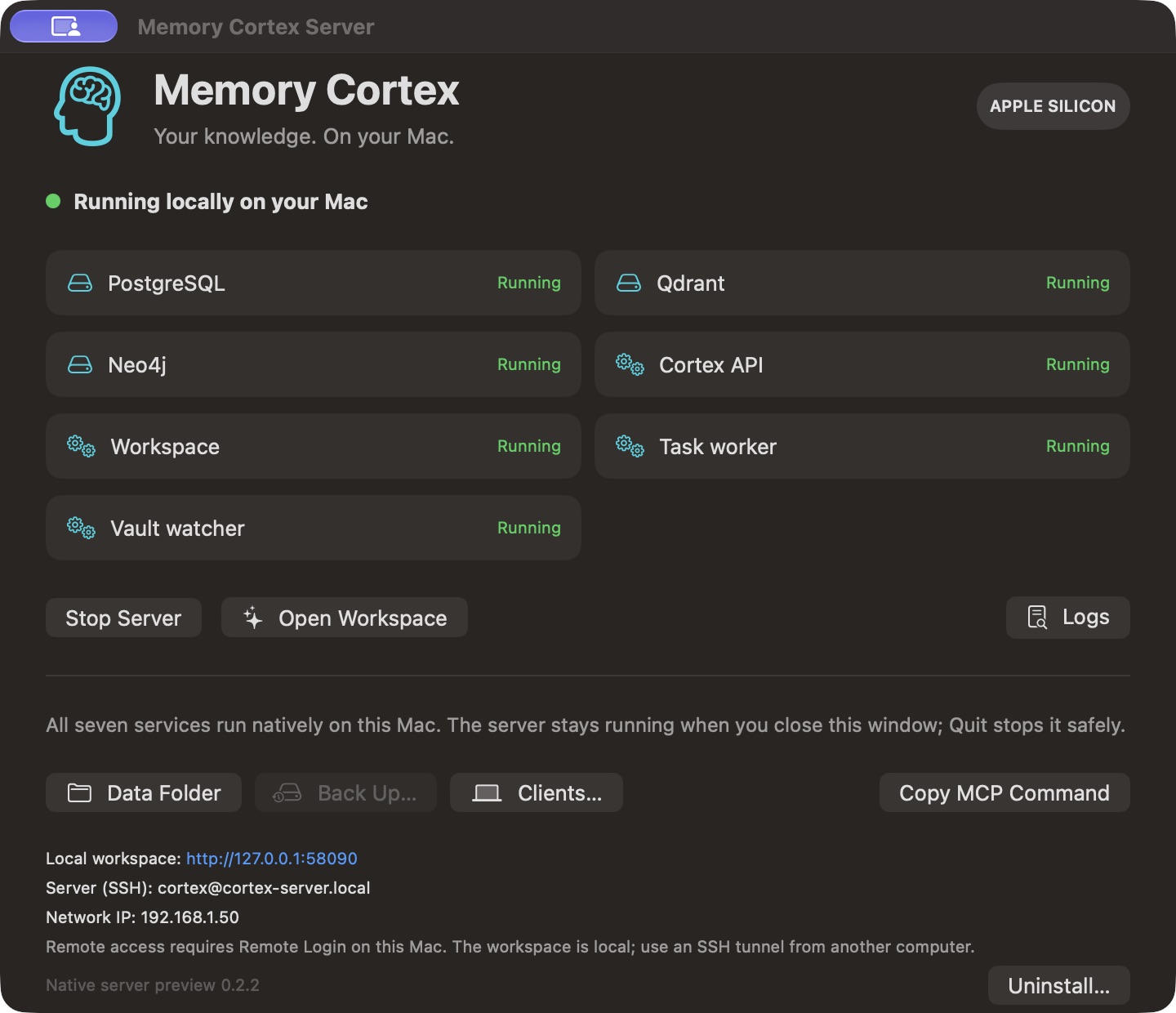
The Apple Silicon app includes PostgreSQL, Qdrant, Neo4j, the Cortex API, the workspace, a task worker and a vault watcher. No Docker or Homebrew is needed on the destination Mac.
Start and stop services, open the workspace, manage client access and create a backup from the control panel. A menu bar icon keeps the controls within reach.
Local embeddings and rule-based filing are included. Ask Cortex and AI processing require an LLM configured in Setup, through Ollama or a compatible API. A chat LLM is not bundled.
The Mac server runs while your user session is active. Automatic startup and migration from an existing server are separate setup steps.
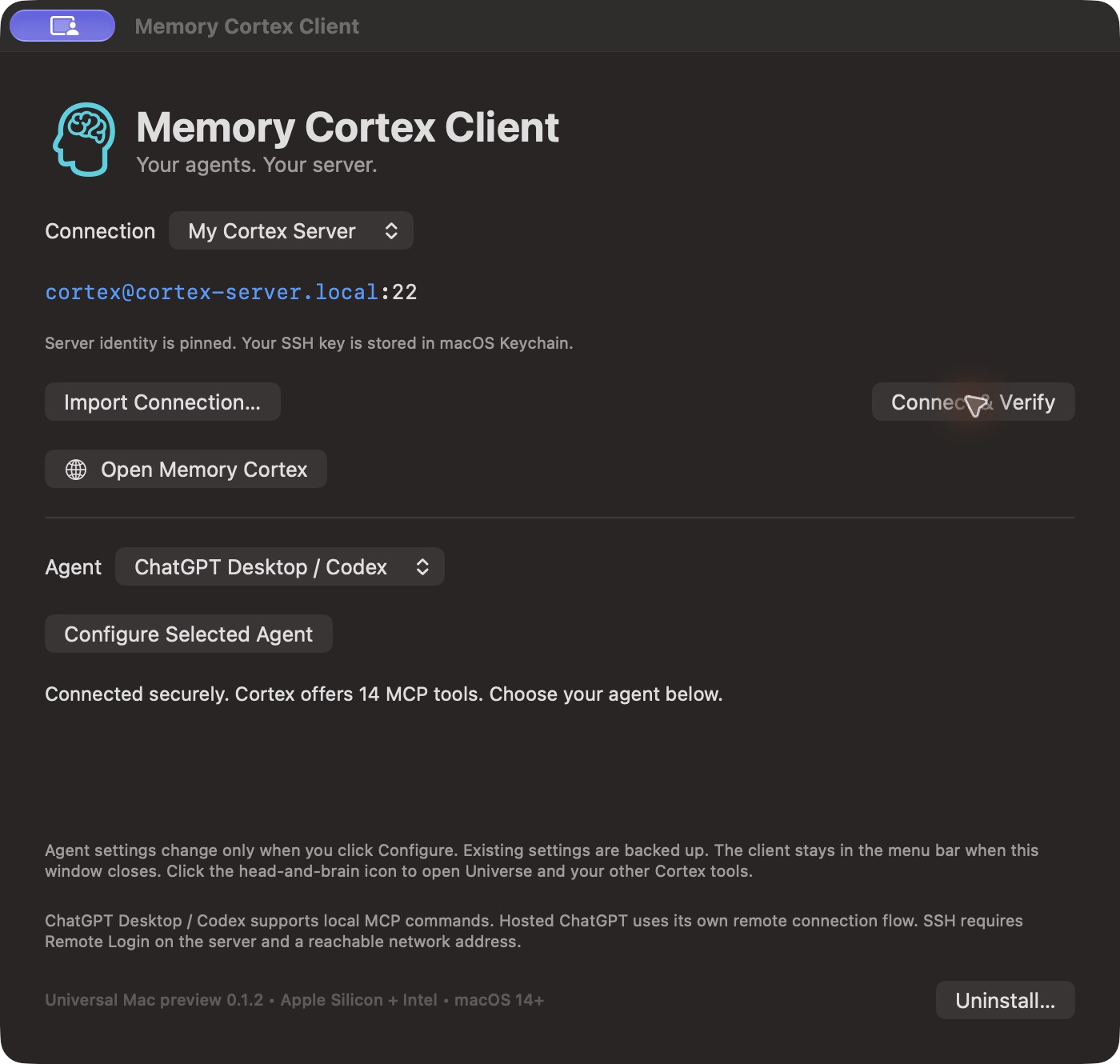
Use Memory Cortex locally or connect to your Mac server over SSH. The universal client works on Apple Silicon and Intel Macs.
Download a configured client from the server’s Clients… panel. First, click Connect & Verify and wait for a successful connection. Then select ChatGPT Desktop / Codex, Claude Desktop, Claude Code, Hermes CLI or another compatible local MCP agent, and click Configure Selected Agent. If verification fails, resolve the connection issue before configuring your agent. Agent selection and configuration stay disabled until verification succeeds.
The client stays in your menu bar. Open Memory Cortex to explore Universe and the rest of the web workspace, choose Connection Setup… to return to setup, or quit when you’re done.
The generic download below contains no connection credentials. Create a private connection file in your server console. Hosted ChatGPT uses its own remote connector flow. The native client enrollment flow currently requires the Mac server.
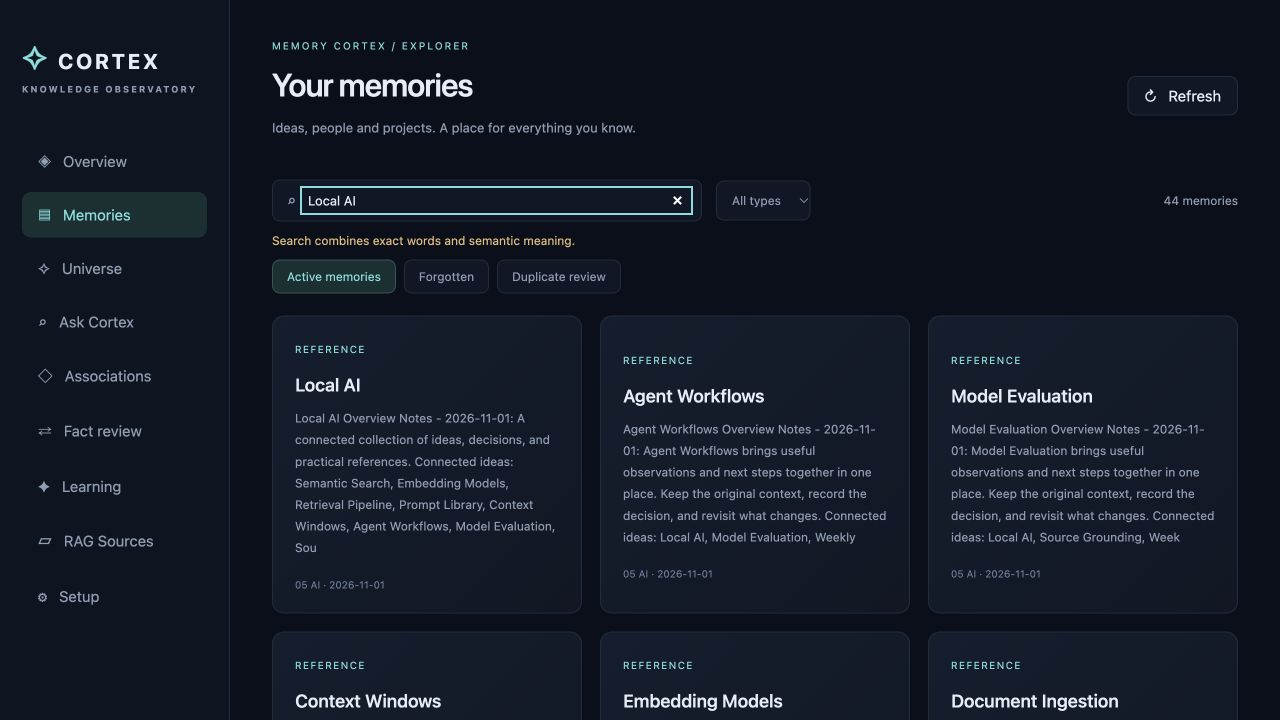
Browse your memories, search semantically, and return to the source. Review forgotten notes, duplicates and changes from the same workspace.
Free downloads. No email signup required. Pick a server, then connect your agents.
Server 0.2.3, client 0.1.4 and uninstaller 0.1.1 are signed with Apple Developer ID, notarized by Apple, and include stapled tickets. Intel client and uninstaller binaries are included; Intel hardware testing remains. View server notarization records · Client 0.1.4 notarization.
0.2.3 · Apple Silicon · macOS 14+
The complete native server stack, local embedding model and control panel. The DMG also includes the uninstaller.
Download Mac server · 778 MB0.1.4 · Universal · macOS 14+
The background SSH client and agent connection helper. Supports Apple Silicon and Intel. Agent setup unlocks after successful connection verification. Reopen Connection Setup… from the menu bar. Import a connection file from your Mac server console; the current server download still bundles client 0.1.3, so use this client for the new setup controls.
Download Mac client · 2 MB1.3.4 · Debian 13 · x86-64
An installation wizard for a fresh Debian host or VM. Requires sudo, internet access and at least 8 GiB RAM. Dependencies are downloaded during setup.
Download installer script · 348 KB0.1.1 · Universal · macOS 14+
Remove the server, client or both. Keeping your server data and saved connection keys is selected by default. Review the choices before removal.
Download uninstaller · 658 KBApplication source, native Mac build and packaging scripts, Debian installer tooling, tests and documentation. Source snapshot a76cb4a; packaged runtimes are separate downloads.
All download checksums · Verify a file’s SHA-256 before installing. Checksums confirm file integrity; they are not a publisher signature.
No. It includes the local embedding model for semantic search and local rule-based processing. Configure Ollama or a compatible LLM API in Setup to use Ask Cortex and AI processing.
Yes. The Mac client connects to the native Mac server over SSH and opens its workspace in your browser. Enable Remote Login for the server account and use an address reachable from your client, such as a LAN or VPN address. The Debian installer has its own remote agent setup; see its guide.
In ~/Library/Application Support/Memory Cortex/, separate from the application. Use Data Folder to inspect it. Stop the server before choosing Back Up to create a consistent archive.
A fresh Mac installation starts with an empty vault. It does not move existing Debian data automatically. Back up the original server and plan a compatible migration separately.
The server requires Apple Silicon and macOS 14 or later. The client and uninstaller include both Apple Silicon and Intel binaries for macOS 14 or later. These are preview releases, and Intel hardware validation is still pending.
Enjoying the apps? An optional tip helps support Memory Cortex and independent software development. All downloads stay free.